
You upgraded to a 300mm/s printer. You dialed in pressure advance. You ran input shaper. You're still getting underextrusion blobs at layer transitions, spaghetti on fast infill, and walls that look like the nozzle ran out of plastic halfway through. You've done everything right — and it still looks like this.
The problem isn't your calibration. It's that your hotend physically cannot melt filament fast enough to keep up with what your slicer is asking of it.
This is a volumetric flow rate problem. And it's the most common undiagnosed reason why high-speed printing doesn't look high quality.
The PhysicsWhat Volumetric Flow Rate Actually Means
Speed settings in your slicer (mm/s) only tell the toolhead how fast to move. What actually matters to print quality is how much melted plastic exits the nozzle per second — measured in cubic millimeters per second (mm³/s).
A 0.2mm layer, 0.4mm line width, printing at 200mm/s requires 0.2 × 0.4 × 200 = 16 mm³/s. Bump that to 300mm/s and you need 0.2 × 0.4 × 300 = 24 mm³/s.
Here's the problem: a standard all-metal hotend with a stock brass nozzle tops out around 12–15 mm³/s for PLA. You're asking it for 24 mm³/s. It melts what it can and skips the rest. Your slicer doesn't know this — it keeps commanding the motor to push filament at the full rate, which means your extruder is grinding, skipping, or starving the nozzle.
The symptom looks exactly like a partial clog, wet filament, bad retraction settings, or a calibration error. It isn't any of those things.
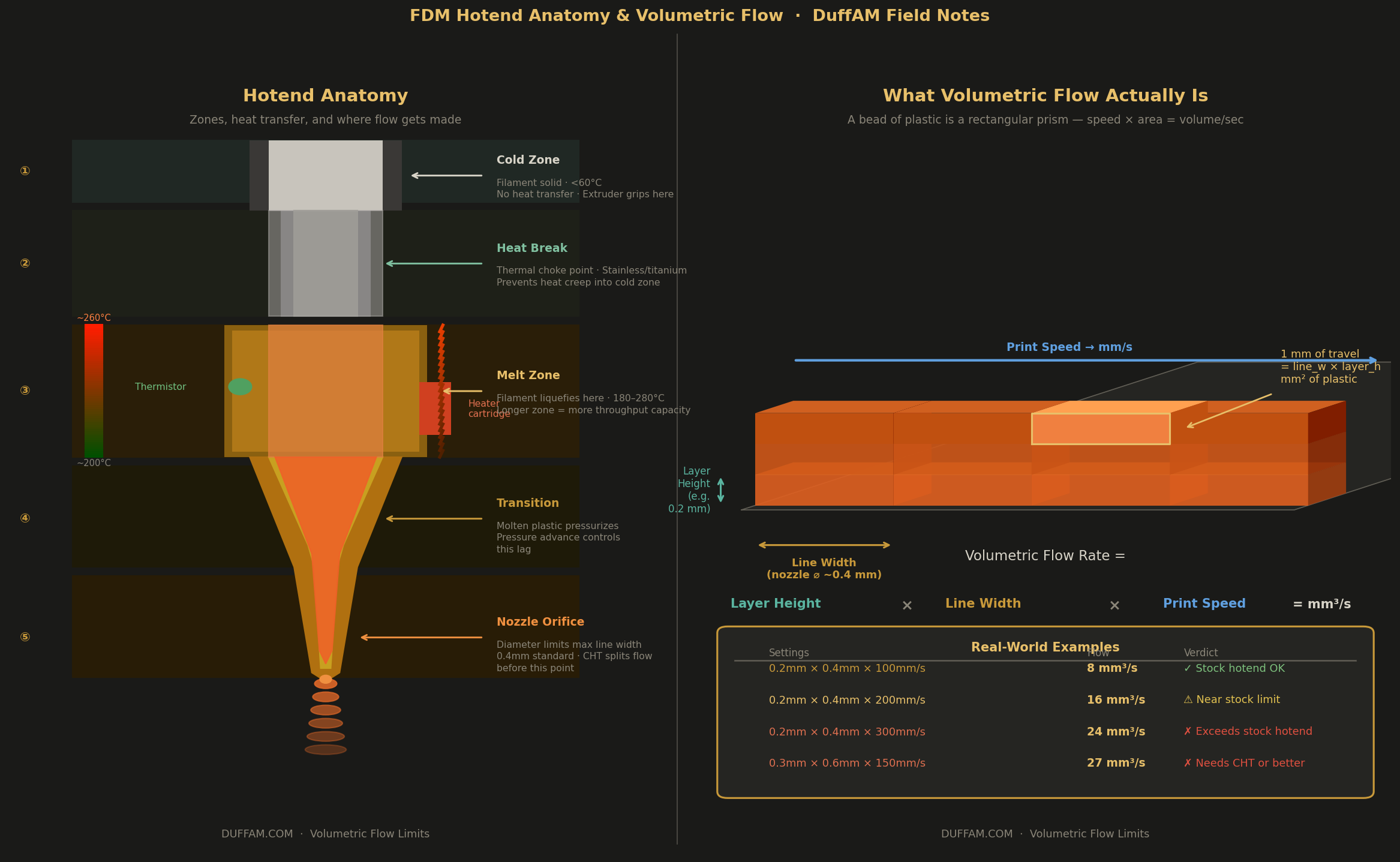
The Flow Ceiling by Hotend Type
Different hotend designs have wildly different thermal mass and melt zone lengths, which translates directly to how much material they can process:
| Hotend Type | Approx. Max Flow (PLA) | Notes |
|---|---|---|
| Standard brass nozzle (e.g. stock Ender 3) | 8–14 mm³/s | Adequate for ≤100mm/s at 0.2mm layers |
| Volcano / long melt zone | 20–30 mm³/s | Better for large nozzles and fast infill |
| High-flow CHT-style nozzle | 20–35 mm³/s | Splits flow internally for more surface contact |
| All-metal high-temp (Rapido, Revo Voron) | 25–40 mm³/s | Required for serious speed printing |
| Bambu X1 / P1 stock hotend | ~28 mm³/s | Why Bambu gets away with 300mm/s in real use |
Bambu Lab gets you to 300mm/s reliably not because their motion system is magic — it's because their hotend is engineered to actually melt that much plastic in time. When you upgrade a stock Ender 3 with a Sprite extruder and start chasing 250mm/s, you're building a race car with a tricycle engine.
DiagnosisHow to Find Your Actual Flow Ceiling
Don't guess. Run a volumetric flow rate test. Most slicers have one built in — OrcaSlicer and Bambu Studio call it "max volumetric speed" calibration, and it prints a series of line segments at increasing speeds while keeping all other settings constant.
What you're looking for: the point where lines go from clean and continuous to rough, gappy, or stringy. That transition point is your practical flow ceiling.
Manual method: in your slicer, look for a "Max Volumetric Speed" setting (OrcaSlicer, SuperSlicer, and Bambu Studio all have this field per-filament). Set it to your tested ceiling. The slicer will automatically cap your print speed so it never demands more flow than your hotend can deliver — even if your speed setting says 300mm/s.
This single setting prevents more print failures than any amount of pressure advance tuning.
Material MattersMaterial Changes the Ceiling — A Lot
Your hotend's flow limit isn't a fixed number. It changes with every material you swap. PLA melts easily and has relatively low viscosity, so it flows well even in short melt zones — max volumetric speeds for PLA tend to be the highest. PETG is stickier and wants a longer dwell time in the hot zone; its effective flow ceiling is often 20–30% lower than PLA on the same hotend, even though people print it at similar speeds.
ABS/ASA are more similar to PETG in viscosity — and the enclosed printing requirement means your hotend ambient temperature is higher, which actually helps melt rate slightly. But at high speeds, layer adhesion suffers before you hit the flow ceiling.
PCTG (polycarbonate-modified PETG, built on a CHDM backbone rather than standard EG) has lower moisture absorption than PETG (~0.15% vs ~0.4%), which means you're not fighting steam-induced flow interruptions at speed. Its melt rheology is also more consistent than standard PETG across a temperature range, making it a significantly more predictable material to run at high volumetric throughput. If you're printing functional parts and keep fighting PETG at speed, PCTG is worth the switch.
Nylon and PC have high viscosity and genuinely need a Volcano or CHT nozzle to hit reasonable print speeds. Running them through a standard melt zone is asking for consistent underextrusion.
A Common TrapWhy Your Infill Fails Before Your Perimeters
A subtlety that trips up a lot of people: perimeters and infill have different flow demands, even in the same print. Perimeters move at a set speed with constant direction changes — those changes slow the toolhead briefly, giving the hotend micro-moments to catch up. Gyroid or lightning infill at high speeds runs in long, continuous zigzag strokes with no direction changes and no micro-pauses. The hotend must sustain maximum volumetric output continuously.
If your infill looks gassy, rough, or has visible voids while your perimeters look clean — you've found your flow ceiling in the infill. The fix: either lower infill speed specifically (most slicers let you set infill speed independently), or upgrade your hotend.
Quick ReferenceThe Fast Diagnosis
- 1Calculate your current volumetric demandlayer height × line width × print speed.
- 2Compare to your hotend's known or tested ceilingfor that material.
- 3If demand exceeds ceilinglower speed, upgrade hotend, or set Max Volumetric Speed cap in slicer.
- 4If demand is under ceilingyour problem is something else — pressure advance, resonance, wet filament, or Z offset.
Most "mysterious" underextrusion issues at 200mm/s+ are step 1–3 problems dressed up as step 4 problems.
Next StepsThe Upgrade Path
If you're regularly printing PETG, PCTG, or ASA at speed, the clearest bang-for-dollar upgrade is a CHT-style nozzle ($8–20) before spending $80+ on a new hotend. The CHT's internal divider increases melt surface area by splitting the filament stream — it's worth testing before assuming you need a full hotend swap.
Beyond that: a Volcano-style hotend if you want a 0.6mm+ nozzle and true high-throughput printing, or a purpose-built high-speed hotend (Rapido 2, Bambu-style ceramic heater block) if you're pushing sub-200µm layers at 300mm/s+.
Speed-printing is a legitimate capability on modern hardware. But it requires the whole stack to be matched — and the hotend is almost always the part that wasn't.
Precision Parts, Real Flow Testing
Every DuffAM part is printed on hardware matched to its material's actual flow ceiling — not just a speed setting someone copied from a forum.
Order Direct at DuffAM