
You've been chasing this print problem for an hour. You've re-leveled the bed, bumped the temperature up, tweaked your retraction settings, and even swapped to a fresh nozzle. The prints still look rough. Stringy in weird places. Weak in ways you can't explain. Maybe there's a faint crackling sound coming from the hotend while it prints, but you've almost stopped noticing it.
Here's what's actually going on: your filament is wet.
Not dramatically, visibly wet — not soaked. Just damp enough to ruin your prints in a dozen subtle ways that look exactly like a half-dozen other problems. Moisture in filament is the great impersonator of 3D printing failures, and it costs more wasted time and filament than almost any other issue.
The PhysicsWhat's Actually Happening Inside the Hotend
When filament absorbs moisture from the air — and it does, constantly, even sitting on your desk — that water doesn't just sit there harmlessly. The moment the damp filament hits your hotend and crosses roughly 100°C, that moisture flash-vaporizes into steam.
Steam that has nowhere to go except through the nozzle with your filament.
The result is micro-bubbling and inconsistent flow. Sometimes it's a subtle fizzing that degrades surface quality. Sometimes it's a sharp pop that sends a tiny blob of plastic somewhere it doesn't belong. And with highly hygroscopic materials like Nylon or PVA, it's an aggressive, audible crackling that makes it obvious something's wrong — though even then, plenty of people assume it's a clog.
The tricky part is that moisture damage doesn't always look the same. It can show up as:
- Unexplained stringing on a profile that used to print cleanly
- A rough, almost frosted surface texture on what should be smooth walls
- Layers that look like they didn't bond properly, even at correct temperatures
- Random blobs or zits that appear inconsistently across the print
- Extrusion that seems "sputtery" without any sign of a partial clog
That last one fools people the most. You check for a clog, find nothing obvious, and move on to adjusting settings that were never the problem.
Know Your MaterialsNot All Filaments Are Equal
Some materials are dramatically more vulnerable to moisture than others, and this matters for how you treat them.
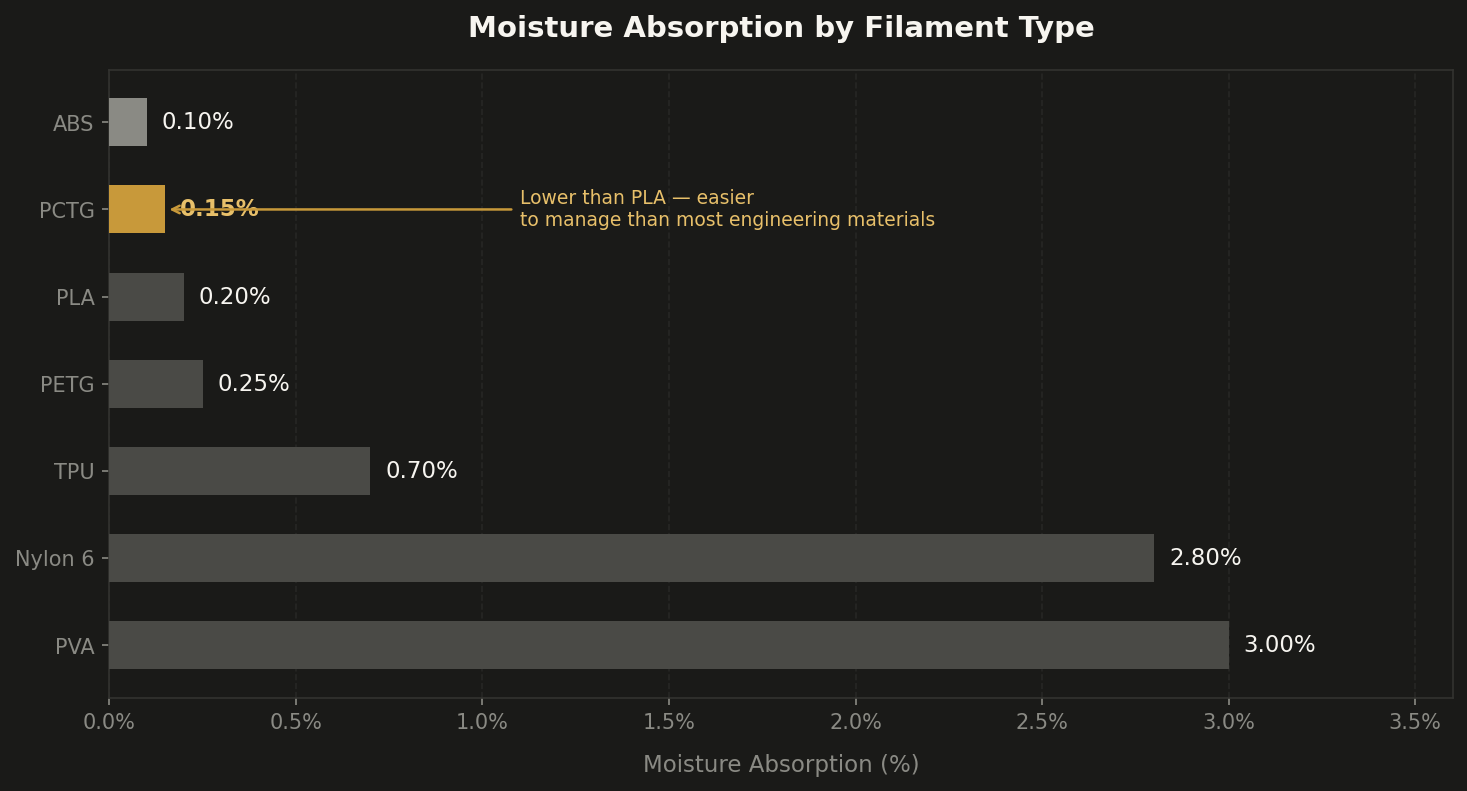
PLA and ABS are relatively forgiving — they'll absorb some moisture, but you generally have days or weeks of open-air storage before print quality degrades noticeably. PETG sits in a slightly more sensitive middle ground: it's easy to print, which lulls people into thinking it's bulletproof, but it's actually quite good at quietly absorbing humidity and producing subtly worse prints.
One material worth knowing about that often gets overlooked here is PCTG. It's a modified version of PETG — the CHDM in its polymer chain gives it better toughness and clarity than standard PETG — and it absorbs moisture at roughly 0.15%, which is actually lower than PLA. That makes it unusually forgiving for an engineering-grade material: you get better layer adhesion, less brittleness, and a cleaner surface than PETG, with moisture sensitivity that's easier to manage than most. If you're looking to step up from PLA without dealing with the storage anxiety that comes with Nylon or even standard PETG, PCTG is worth a look.
Nylon is in a different category entirely. A fresh, unsealed spool of Nylon can go from printable to visibly compromised in under six hours of open-air exposure in a humid room. If you live somewhere muggy and you're trying to print Nylon without active drying, you're fighting a losing battle.
The common advice is "store your filament in bags with desiccant." That's fine maintenance advice, but it doesn't solve the problem once moisture is already in the filament. Silica gel is a preventive measure, not a cure.
DiagnosisHow to Actually Tell If Your Filament Is Wet
Before you start drying everything in sight, it's worth diagnosing whether moisture is actually your problem. Not every bad print is wet filament, and going down the drying rabbit hole when something else is wrong wastes time.
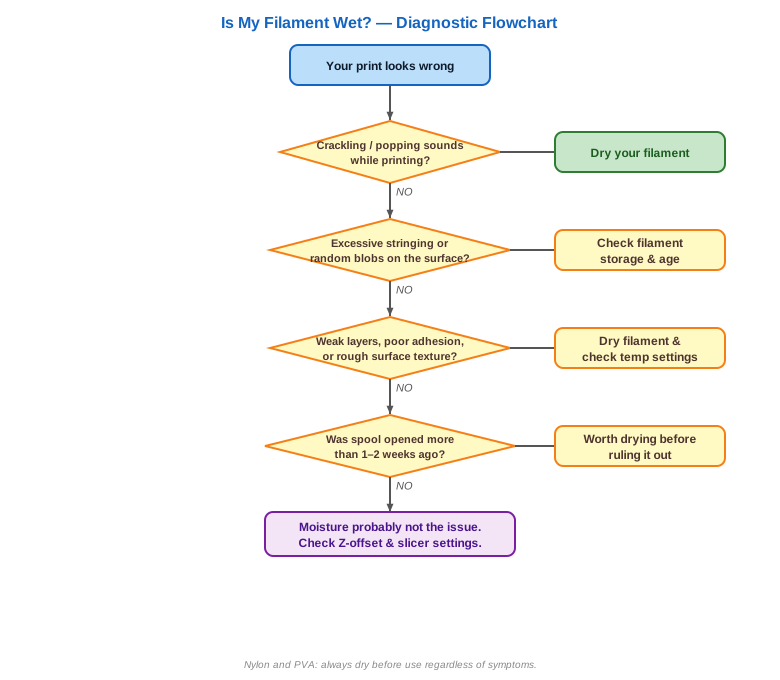
The fastest and most reliable test: listen while the printer runs. If you hear consistent crackling, popping, or hissing from the hotend during a print, moisture is almost certainly present. The steam vaporizing is making that noise.
If there's no sound but prints are still rough, it gets trickier. Ask yourself: when was this spool last sealed? Has it been sitting out for more than a week or two? Is this a material known to be hygroscopic (PETG, Nylon, TPU)? If yes to any of these, drying is worth trying before you adjust anything else.
One thing that trips people up: they open a brand-new spool and still get wet-filament symptoms. This happens more often than you'd think. Filament can absorb moisture during storage and shipping, especially if the vacuum seal on the bag was compromised. A new spool is not automatically a dry spool.
The FixDrying Filament: The Practical Reality
The good news is that moisture is reversible. You just need heat and time.
A dedicated filament dryer is the cleanest solution — they're cheap, designed for the job, and many let you print directly from them while the spool is warming. If you're printing PETG or Nylon with any regularity, owning one pays for itself quickly in saved filament and avoided headaches.
A food dehydrator works well too:
| Material | Temp | Time |
|---|---|---|
| PLA | 45–50°C | 4–8 hours |
| PETG / PCTG | 55–65°C | 4–8 hours |
| Nylon | 70–80°C | 4–8 hours (longer if very damp) |
Verify your dehydrator's actual temperature with a thermometer — the dials on cheap models are often wrong by 10–15 degrees.
What doesn't work as well as people assume: your kitchen oven at its lowest setting. Most residential ovens cycle too aggressively and can't maintain the low, steady heat that filament needs without risking warping the spool. If you're going to use an oven, use a separate thermometer and watch it closely.
After drying, the print quality difference is usually immediate and obvious. If you dry a spool and the crackling stops and the surface quality jumps back up, you've found your culprit. If quality is still rough after drying, then moisture wasn't the issue and you can move on to actually troubleshooting other things.
TakeawayThe Real Lesson
The frustrating thing about wet filament isn't that it's hard to fix. It's that it masquerades so effectively as other problems. The instinct when a print looks bad is to reach for slicer settings — temperature, retraction, speed — and start tuning. That can burn hours chasing a problem that a few hours in a dryer would have solved outright.
Before your next deep-dive into slicer settings, run the cheaper test first: listen to the hotend, check when the spool was last sealed, and if there's any doubt, dry it. It's the fastest diagnostic step in this entire hobby, and it's the one most people skip.
Dry Filament, Every Print
Every DuffAM part is printed from properly dried, moisture-controlled material — PLA, PETG, PCTG, ABS, and ASA alike.
Order Direct at DuffAM