You track filament brand, nozzle temp, retraction distance, even ambient humidity. The one part actually touching every gram of plastic that leaves your hotend — the nozzle orifice itself — doesn't get tracked at all. It just gets used until something looks wrong, and by then the drift has been happening for days.
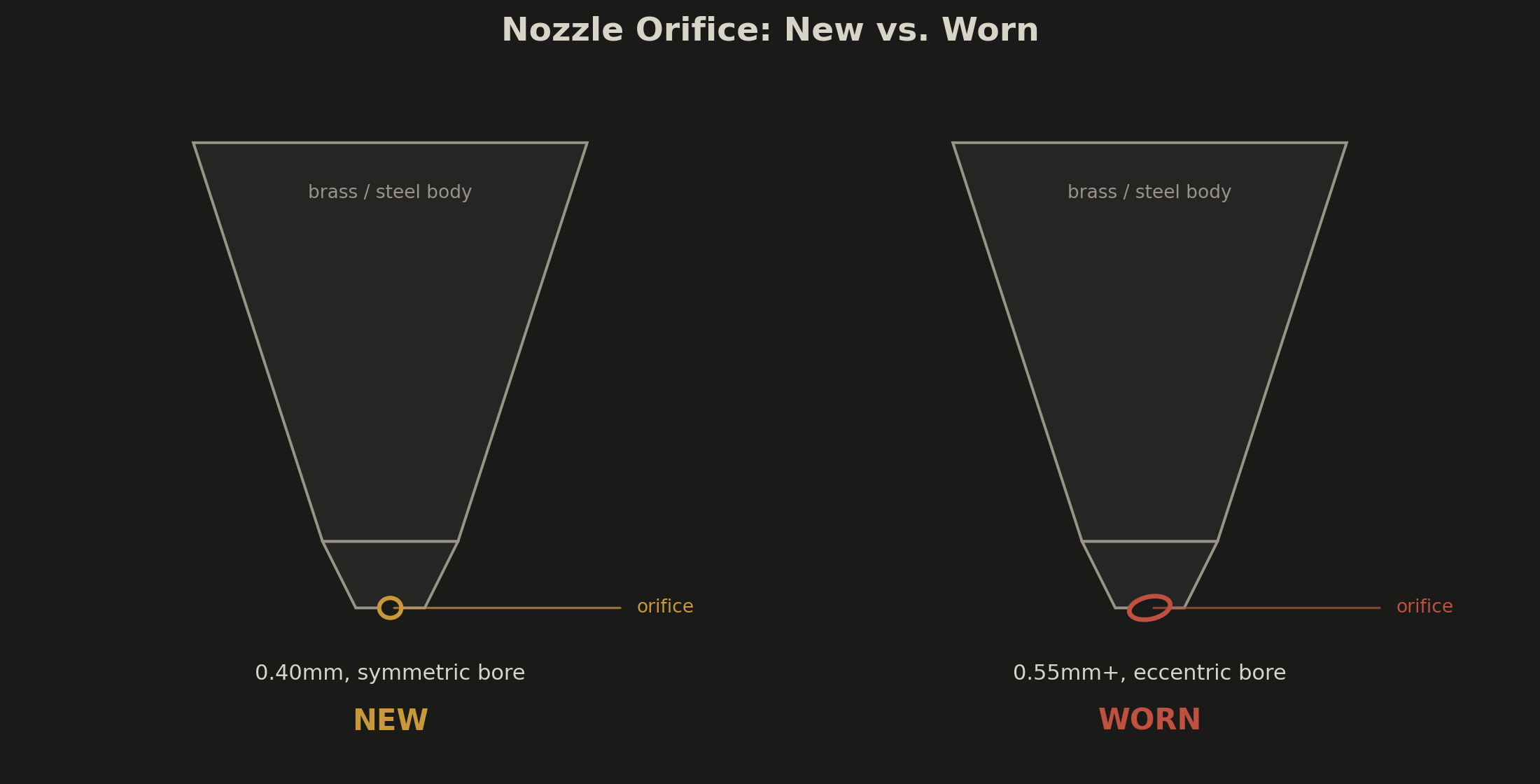
Nozzle wear isn't a failure mode. It's a wear curve, and it's silent. The orifice starts at 0.4mm and grows a little with every kilogram of abrasive material that passes through it. Holes print slightly small. Walls print slightly thick. Press-fit parts get looser. None of it looks like a nozzle problem, so it gets diagnosed as everything else first — a bad filament batch, a slicer flow ratio that needs recalibrating, humidity, a firmware update that "changed something."
| Symptom / Value | What It Means |
|---|---|
| Holes print undersized, walls print oversized, same slicer profile as before | Orifice has grown past nominal — you're over-extruding relative to what the slicer assumes |
| Bore looks oval or eccentric under a loupe or macro lens | Asymmetric erosion from fiber strands hitting one side of the channel harder |
| Quality was fine at the start of a long batch, degrades print to print | Real-time wear during the run, not a one-off calibration miss |
| Flow ratio tweak fixes it for a week, then it drifts again | You're chasing a moving target instead of replacing the part |
| Brass nozzle has run 1–2 kg of CF/GF-filled filament | Very likely past its usable life for abrasive work |
| Hardened steel has run several kg of CF/GF and dimensions are still creeping | Even hardened steel has a ceiling — check bore diameter directly |
Every Other Wear Part Announces Itself. This One Doesn't.
Belts stretch and start skipping teeth audibly. PTFE tubing degrades and lets filament ooze past the collet. Bearings get loud. The nozzle just quietly gets bigger, and a bigger orifice means more plastic comes out per unit of extruder rotation — which the slicer has no way of knowing, because it's still computing flow based on the diameter you told it when you set up the profile, not the diameter that's actually there now.
With unfilled PLA or PETG, this is a slow, mostly irrelevant process — plain brass can run for months without measurable change. The moment carbon fiber, glass fiber, or any filled filament enters the picture, the timeline compresses hard. Chopped carbon fiber strands are abrasive enough to put measurable wear on a stock 0.4mm brass orifice within 15 to 20 hours of print time. Left unaddressed, that same brass nozzle can go from 0.4mm to 0.6mm or wider well within a single kilogram spool, and at that point extrusion width is no longer something your slicer settings control — the hardware has already decided.
The SpreadWhat Actually Wears, and How Fast
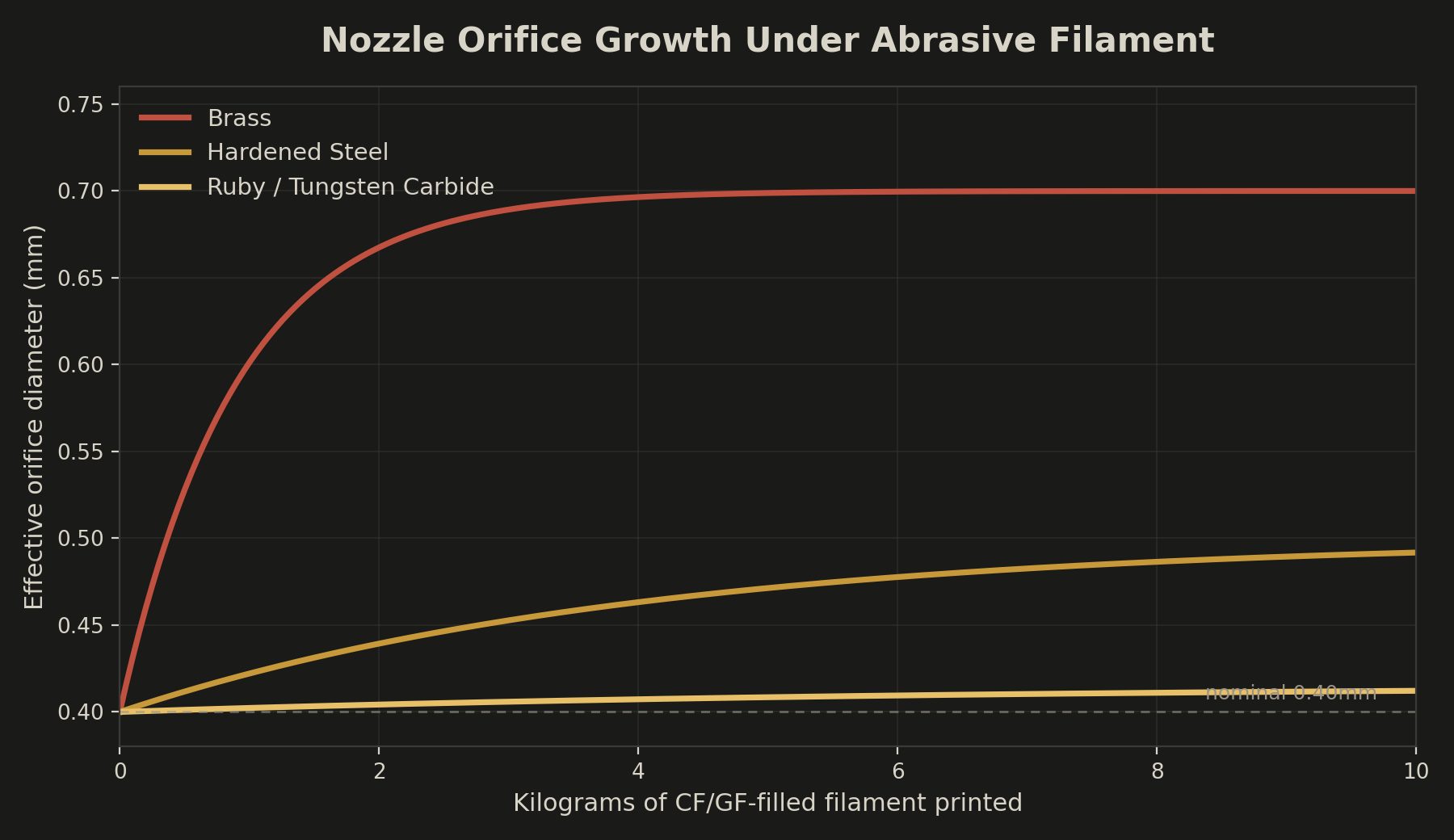
Nozzle material is the entire variable here, and the spread is bigger than most people assume when they buy whatever came in the box.
Brass
- Fine for PLA, PETG, TPU, unfilled PCTG
- 1–2 kg realistic ceiling on CF/GF
- Visible drift well inside one spool of abrasive material
Hardened Steel / Ruby / Carbide
- The default once fiber-filled filament is in rotation
- Hardened steel: several kg before drift; needs +5–10°C vs. brass baseline
- Ruby/carbide: rare measurable wear past 8 kg, best for full-time CF/GF work
Checking Wear Without Guessing
You don't need a microscope to catch this before it costs you a batch of parts.
- 1Pin gauge or drill bit check. A 0.40mm pin gauge (or the shank of a 0.40mm drill bit) should sit snug in a fresh nozzle and noticeably loose in a worn one. This is the single fastest confirm-or-rule-out test available.
- 2Single-wall test cube. Print a simple single-wall box with a known nominal wall thickness and measure it with calipers. A wall reading meaningfully over spec on a profile that used to print to tolerance is your orifice telling you it's grown.
- 3Log throughput by material, not just by nozzle. Track kilograms of CF/GF-filled filament run through each physical nozzle, separately from unfilled material. A brass nozzle that's seen 1.5 kg of PETG-CF is due for replacement even if it's only been installed a few weeks.
- 4Don't chase it with flow ratio. If you're nudging flow percentage upward every few prints just to keep dimensions in spec, that's not calibration — that's compensating for a part that needs to be swapped.
- Pin-gauge or drill-bit test before assuming a slicer or filament problem
- Print and measure a single-wall test cube against known nominal thickness
- Log CF/GF kilograms per physical nozzle, not per calendar week
- Stop nudging flow ratio upward as a permanent fix
- Match nozzle material to filament type before starting a CF/GF job, not after
The PCTG Exception
Unfilled PCTG is one of the gentlest engineering filaments a brass nozzle will ever see — its modified CHDM structure gives it moisture absorption around 0.15%, lower than PLA and a real step up from standard PETG, with none of the abrasiveness of a fiber-filled blend. That changes the instant you move to PCTG-CF: the carbon fill turns it into the same nozzle-eating material as any other CF-loaded filament, and it needs the same hardened-steel-or-better treatment. Same base polymer, completely different nozzle life.
The Real Fix Is a Parts Bin, Not a Recalibration
The fix here isn't a firmware tweak or a slicer profile — it's treating the nozzle like the consumable it is. Keep a stock of hardened steel nozzles on hand the moment any CF- or GF-filled material is in regular rotation, swap based on logged kilograms rather than waiting for a bad part to tell you, and reserve ruby or tungsten carbide for whichever printer actually lives on abrasive filament full time. A worn nozzle doesn't announce itself with a failed print — it announces itself as a part that's very slightly, very consistently, wrong, right up until someone measures it and finds out why.
If a part needs to hold tolerance across a full production run regardless of which material it's printed in, that's the kind of consistency DuffAM's process is built to guarantee before the part ever ships — see our realistic capabilities breakdown for where that line sits.
Parts That Hold Tolerance, Batch After Batch
Every DuffAM nozzle is matched to the material running through it and swapped on logged throughput, not guesswork — so the dimensions you approved on part one are still there on part fifty.
Order Direct at DuffAM →Same carbon-fill abrasiveness problem, applied to when PCTG-CF is (and isn't) the right outdoor material.
Elephant's Foot Isn't Cosmetic — It's a Tolerance ProblemSame base-of-part dimensional error, different root cause — squish and Z-offset instead of a worn orifice.