
You level cold, probe hot, get a clean mesh, and the first layer still comes out perfect in the center and starving at the edges. Or the reverse: crisp edges, a squished blob in the middle. You re-level. Same result. You buy a new sheet. Same result, different day. You start blaming the Z-offset, then the firmware, then the printer itself.
The bed isn't warped. It's doming — and it's doing it after you finished leveling it.
Was taken at the wrong moment
Most bed mesh routines run once, right after the bed hits temperature. The problem is that "at temperature" and "heat-soaked" are not the same thing. A thin spring-steel sheet with a PEI coating expands and settles for ten to fifteen minutes after the heater reports its target number. The aluminum carrier plate underneath heats from the center out, unevenly, and the thin steel sheet on top responds to that gradient by flexing — sometimes gently, sometimes by popping into a completely different shape.
If your mesh is probed the moment the bed reads 85°C, you've mapped a transitional shape that no longer exists five minutes into the print. That's the gap between "the mesh looks perfect" and "the first layer isn't."
It's mechanical, not just thermal
Spring steel sheets are manufactured by rolling, which leaves residual tension in the metal. At room temperature that tension is usually invisible — the sheet looks flat, sits flat, passes every visual check. Add heat unevenly, and thin steel with locked-in tension behaves like the bottom of an oil can: it can sit in one stable position, then pop into a second stable position once enough thermal stress builds up. Center-up (a dome) is the common failure; center-down (a saddle) happens too, especially with weaker magnetic hold in the middle of the bed.
This is why the same printer can behave differently print to print. A short print on a bed that hasn't fully soaked won't trigger it. A two-hour print that keeps building heat will. That inconsistency is exactly what makes people suspect calibration drift, moisture, or driver current before they ever suspect the sheet.
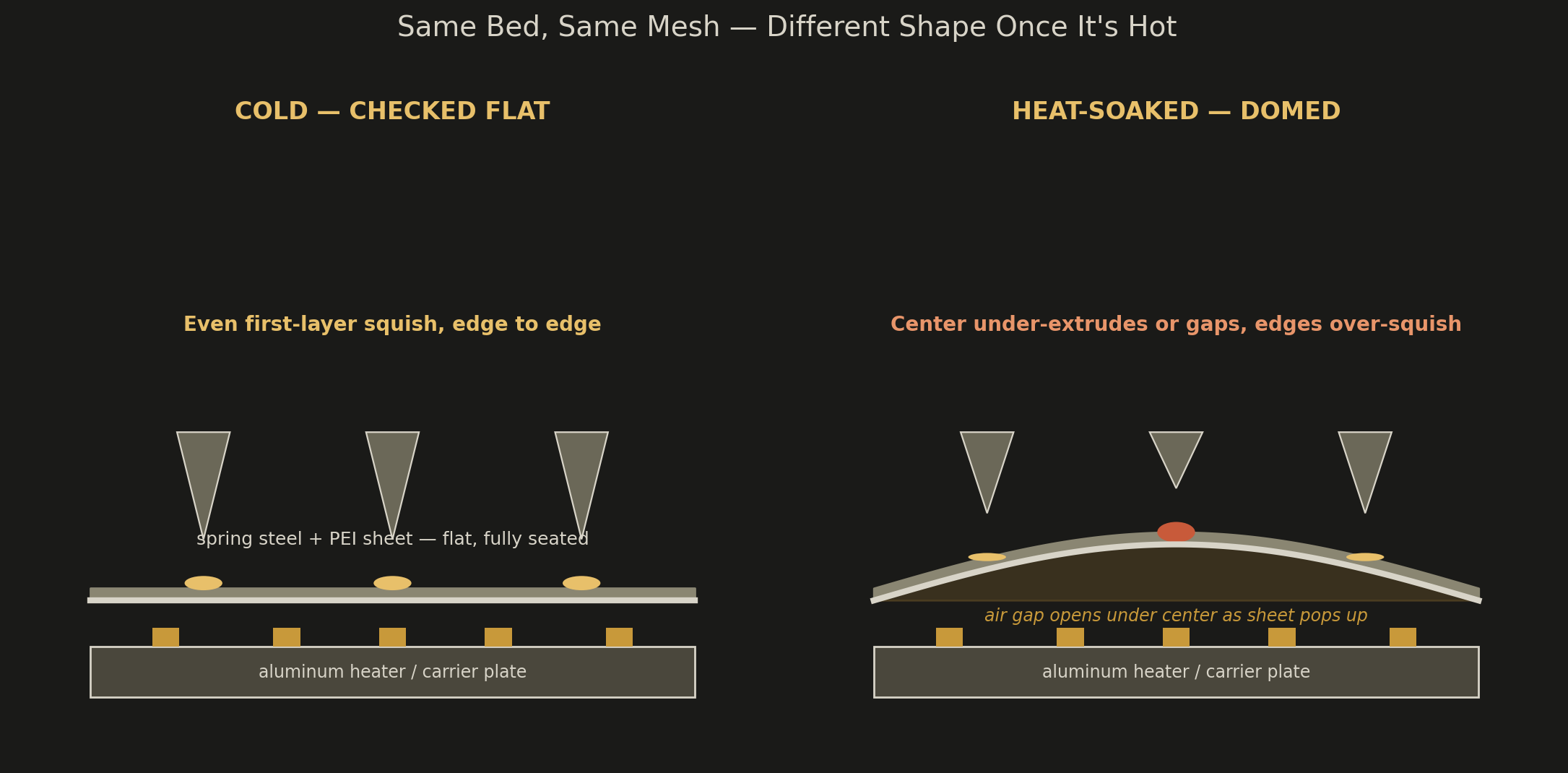
Run this sequence, in order
- Heat-soak before you trust anything. Bring the bed to your print temperature and wait a full 10–15 minutes before probing. If your slicer or firmware lets you delay mesh generation until after a soak timer, use it.
- Check center versus edge with a feeler gauge, hot. Measure right after reaching temp, then again 10 minutes later. If the gap between center and edge grows over that window, you have a thermal dome, not a leveling error.
- Pull the sheet cold and press it flat on a known-flat surface. If it pops between two stable positions under hand pressure, that's residual rolling tension in the steel itself. No amount of re-leveling fixes that — it will keep doing it every time it's heated.
- If the sheet stays flat under that test, look at the heater element and the magnetic base instead. Uneven heating and inconsistent magnet strength across the bed both produce the same symptom without any tension in the sheet at all.
Depends on where the problem lives
Once you've confirmed it's doming and not a mounting or offset issue, the fix depends on where it's coming from. If the carrier plate has a low spot the sheet is telegraphing through, shim it — a strip of foil or Kapton tape under the low area, placed before the magnetic base, gives the sheet a level foundation when it's clamped down. If the mesh is technically accurate but doesn't have enough resolution to track a smooth dome, increase point density near the center of the bed; a 5x5 mesh will miss a gradual bow that a 7x7 or adaptive mesh will catch. And if the sheet itself is popping between stable states, that tension isn't something you compensate your way out of — replace it with a thicker or lower-tension sheet.
Doming scales with bed temperature
Not with your print quality settings. A PLA print running a 60°C bed rarely generates enough gradient to matter. Push into PETG or PCTG territory around 80–85°C and the effect becomes measurable on budget sheets. Get into ABS, ASA, or enclosed nylon prints past 100°C, and a thin sheet with any residual tension will dome enough to exceed your first-layer height.
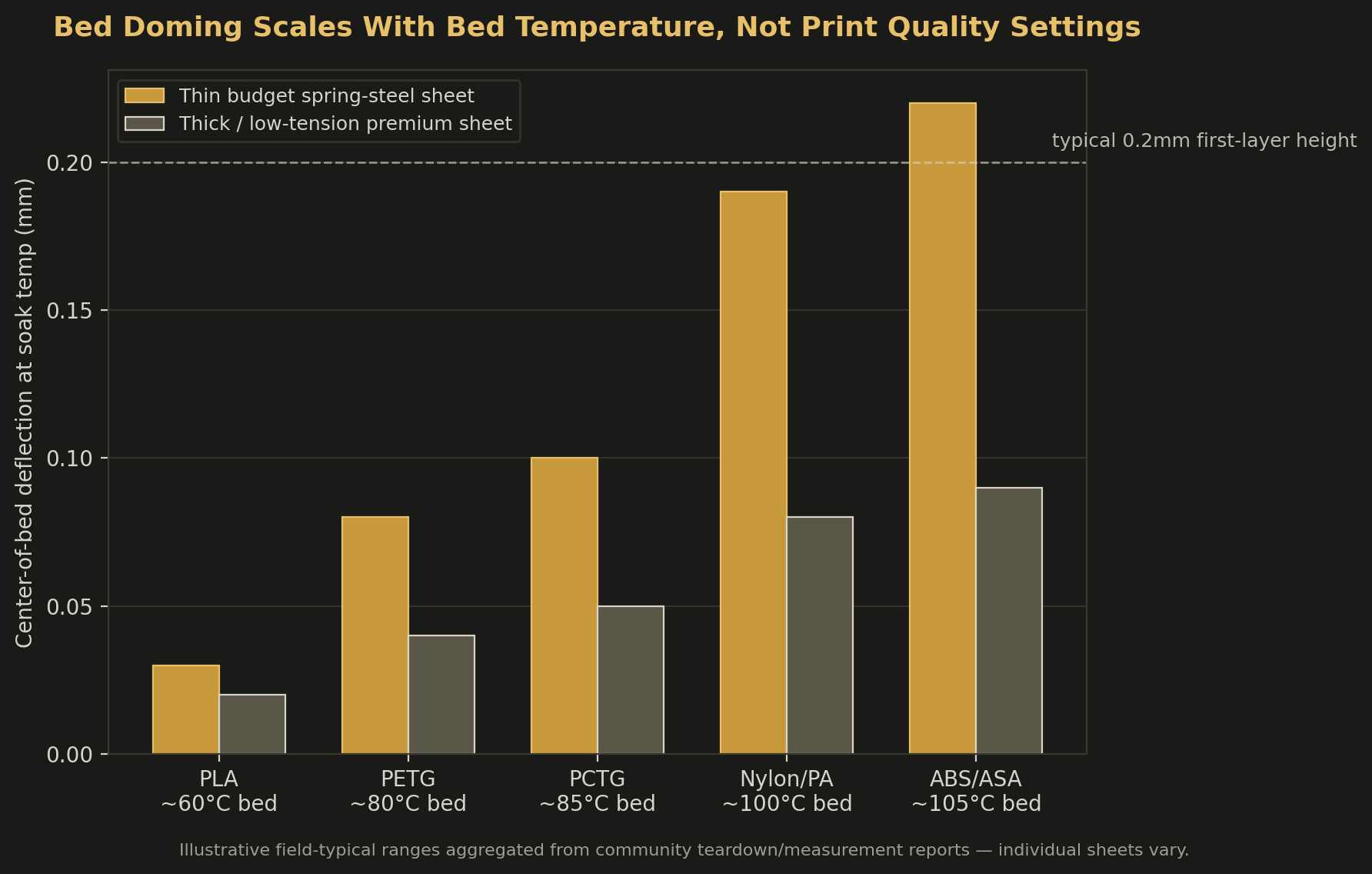
| Material | Typical bed temp | Doming risk on thin sheets |
|---|---|---|
| PLA | ~60°C | Low |
| PETG | ~80°C | Moderate |
| PCTG | ~85°C | Moderate–high |
| Nylon (PA) | ~90–100°C | High |
| ABS / ASA | ~100–110°C | High |
PCTG runs bed temps close to PETG but is meaningfully less hygroscopic — around 0.15% moisture absorption thanks to its modified CHDM structure, well below PLA and a real step up from standard PETG in humid shops. That makes it a strong choice when you want PETG-like toughness without babysitting a dry box. It doesn't buy you any immunity from bed doming, though — the bed temp is what stresses the sheet, not the material's moisture behavior.
Stop re-leveling, start soaking
If your first layer quality depends on where on the bed you're printing and gets worse the longer the bed has been hot, stop re-leveling and start heat-soaking before you probe. No amount of Z-offset tweaking fixes a problem that isn't static.
— DuffAM
The DuffAM Light Puck Bundle
Chasing a dome across your bed is a lot easier to see under consistent light. The Light Puck bundle gives you a printed-and-tested fixture for steady, color-accurate task lighting over your build plate — handy for feeler-gauge checks too.
Shop the Light Puck →