
Layer shift shows up, and the first thing almost every forum thread says is "check your belt tension." Sometimes that's right. Most of the time it isn't, and the printer keeps shifting because the actual fault — a slipping pulley, a heat-soaked stepper driver, a dry linear rail, or acceleration settings the motor can't keep up with — never got touched. Belt tension is the easiest thing to blame because it's the easiest thing to check. It's just not the most common cause.
The fix isn't a universal tweak. It's reading the shift itself. The direction, the timing, and the axis it happens on tell you almost exactly what's wrong before you touch a single screw.
Before You Touch AnythingRead the Shift First
Every layer shift leaves a signature. Before adjusting anything, pull the print — or a photo of it — and answer four questions: Which axis moved, X, Y, or both? Did it shift once or repeatedly? Was the offset the same size each time? And how far into the print did it happen?
Those answers sort almost every layer shift into one of four buckets below, and each bucket has a different fix. Tightening belts addresses exactly one of them — and it's the least common.
What the Pattern Is Actually Telling You
Each failure mode below leaves a distinct signature. Match the pattern first — the fix follows automatically.
Grub Screw Slip
Steady walk in one direction, same axis, roughly the same size each time. The pulley isn't seated on the motor shaft's flat and skips a fraction of a step at every hard reversal. The single most misdiagnosed cause — the axis feels "loose," so people tighten the belt instead.
Driver Thermal Throttling
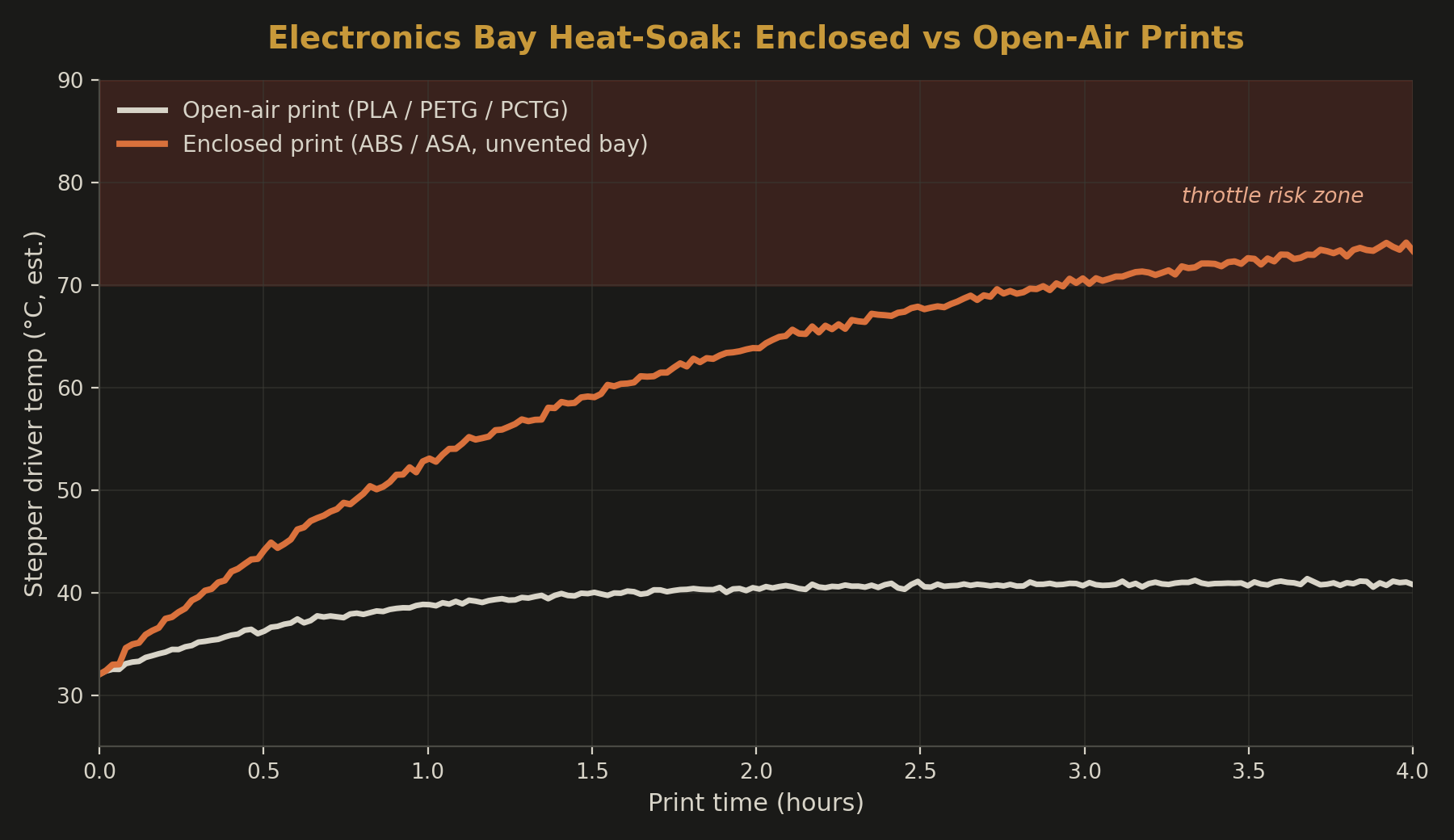
Random timing, shows up an hour or two into a long or enclosed print. TMC-series drivers throttle current once junction temp climbs toward 150°C, and a closed ABS/ASA enclosure heat-soaks an unvented electronics bay faster than most builds account for.
Mechanical Binding
One sudden, large jump, often with an audible clunk or grind. A dry rail, a burred rod, a snagged drag chain, or a belt rubbing on the frame. Tightening a belt here can make it worse by adding preload to a system already fighting friction.
Lost Steps from Acceleration
Clusters around infill patterns or fast travel moves. Accel/jerk values ask the motor to change direction faster than it can hold torque — common after bumping print speed without revisiting motion limits.
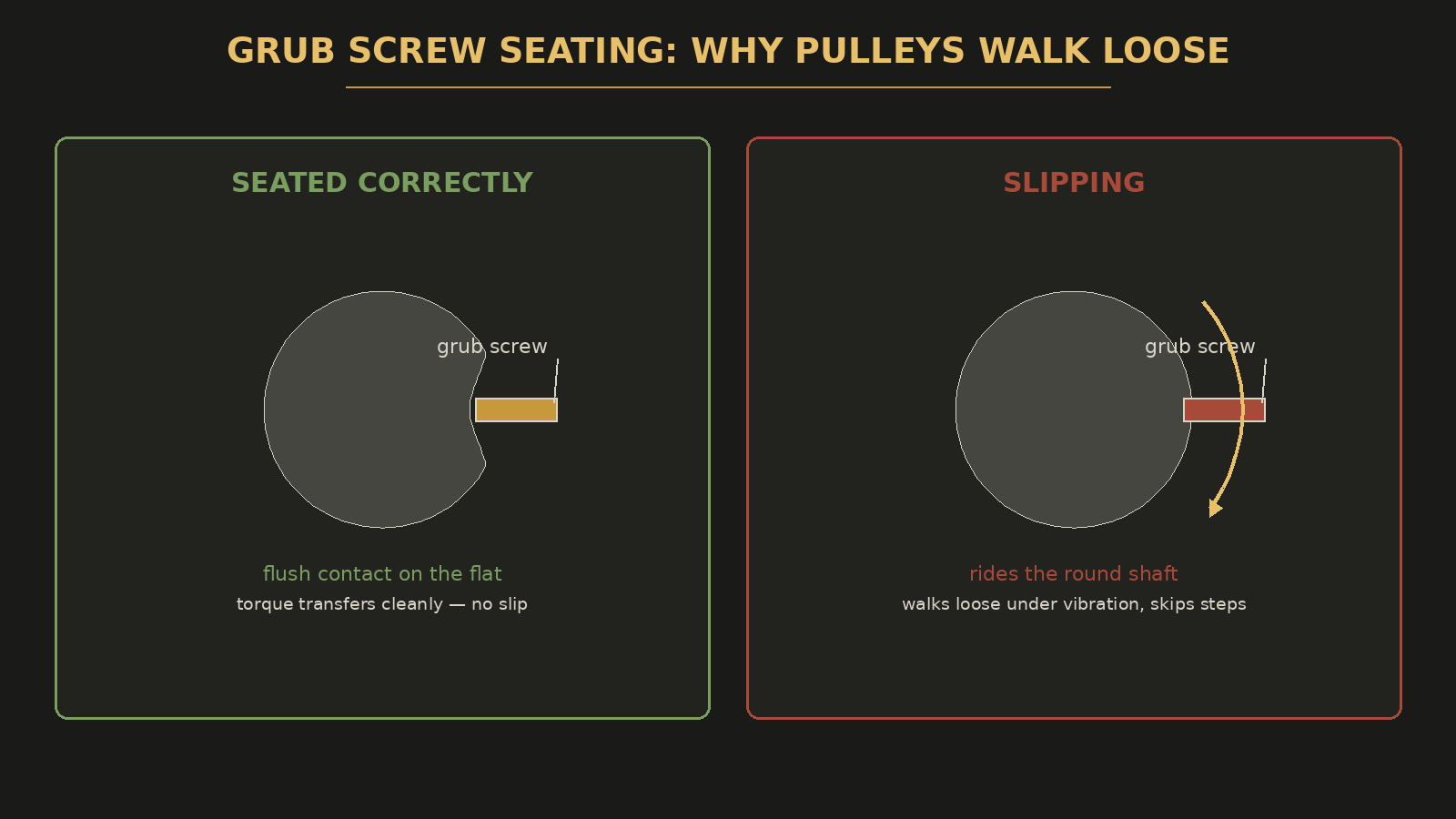
Fixing grub screw slip: back off the belt, expose the pulley, and confirm the screw sits directly on the shaft's flat — not the round part beside it. Snug by hand, then a quarter turn with a hex driver. Blue threadlocker, not red, since you'll need to service it again eventually.
Electronics, Not MechanicsWhen the Enclosure Is the Real Suspect
If a fresh, cool printer runs a file flawlessly but the identical file fails two hours in — and only with the enclosure closed — that's a heat problem, not a mechanical one. Most desktop NEMA 17 setups don't need more than 800–1000mA RMS, and dropping current slightly, adding airflow across the driver board, or venting the electronics bay separately from the print chamber all reduce throttling risk.
Material Note: PCTG
PCTG prints hotter than PLA but doesn't need an enclosure the way ABS/ASA do — typically 250–265°C with no chamber heat required, so it never heat-soaks the electronics bay. Its modified CHDM structure also keeps moisture absorption around 0.15%, well below PLA, meaning it tolerates ambient shop humidity through a long print without the drying rituals PETG sometimes needs. It's a strong step up from PETG for parts that need both toughness and print stability.
| Material | Typical Chamber Need | Moisture Absorption | Driver Heat-Soak Risk |
|---|---|---|---|
| PLA | None (open-air) | Moderate | Low |
| PETG | None (open-air) | Higher, needs drying | Low |
| PCTG | None (open-air) | ~0.15%, low | Low |
| ABS | Enclosed, 45–60°C | Low | High |
| ASA | Enclosed, 45–60°C | Low | High |
If driver-pattern shifts only ever show up on ABS/ASA enclosure jobs and never on PLA or PCTG runs on the same machine, that's confirmation, not coincidence.
The FixThe Order That Actually Works
-
1Diagnose the pattern first Match the shift against the four signatures above before touching any hardware. It tells you which fix to run, not just that something's wrong.
-
2Isolate mechanically Disable steppers and hand-move each axis across its full travel, feeling for local rough spots. Binding is almost always a specific 2–3cm stretch, not uniform drag.
-
3Test acceleration as a diagnostic Drop print and travel accel 20–30% and rerun the file. If shifting stops, you've confirmed the cause and can tune back up gradually, or run input shaping if your firmware supports it.
-
4Belt tension last Only revisit belts if none of the above match and the axis shows visible slack under load.
- Same-direction repeating shift on one axis — check grub screws first
- Shift appears late in long, enclosed prints — check driver temp and current
- One sudden large jump — check for mechanical binding along the full rail
- Shift tied to infill or fast travel — back off acceleration and retest
- Belt tension only after the above are ruled out
Belt tension is a real cause. It's just the fourth or fifth thing to check, not the first — and treating it as the default fix is why so many layer-shift threads end with "tightened the belts, still happening."
Still Fighting This On Your Own Printer?
If it's easier to just have the part made right the first time, tell me what you need — tuned per-material, not left on default settings.
Tell Me What You Need →