
You ran the resonance test. You fed the frequencies into Klipper's [input_shaper] config. You reprinted the calibration cube. The wall still looks wrong.
Here's the uncomfortable truth: input shaping only fixes one thing, and there's a good chance you don't have that thing. "Wavy wall" has become the catch-all diagnosis for four mechanically distinct defects, and three of them are completely immune to input shaping. If you've been chasing accelerometer graphs for a defect that's actually a bent leadscrew or a starved stepper driver, you've been solving the wrong problem — correctly.
The four look-alikes
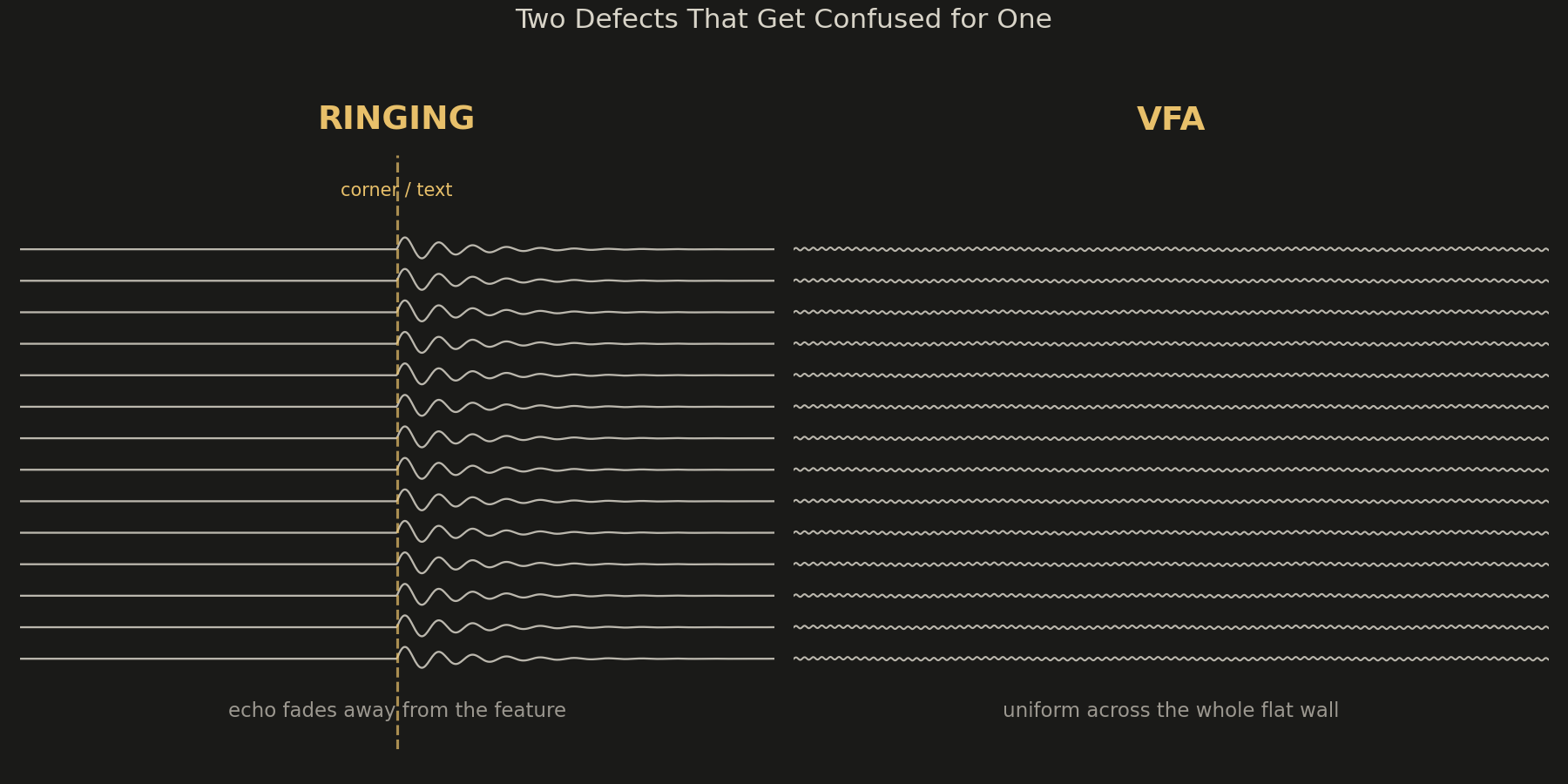
Ringing (true ghosting). This is the only one input shaping actually fixes. It shows up as a decaying wave that radiates outward from a sharp direction change — a corner, a hole, embossed text — and gets weaker with distance from the feature. Look at a printed letter "O": if you see faint echoes rippling away from the curve into the surrounding wall, that's ringing. It's caused by the frame and gantry flexing under acceleration and continuing to oscillate after the toolhead has already moved on. Root cause is mechanical compliance, not motor control, which is exactly why input shaping — which pre-cancels the resonant frequency your printer already has — is the correct fix rather than a band-aid.
VFA (vertical fine artifacts). Fine, tightly spaced vertical lines running the full height of a print, often only visible at a low, raking light angle — they can look like a subtle sheen rather than a defect at first glance. Unlike ringing, VFA doesn't originate from any specific feature and doesn't fade with distance; it's uniform across flat walls. The dominant cause is stepper motor cogging torque — the small periodic force ripple every stepper motor produces — getting transmitted through the belt and frame at a frequency unrelated to your print speed. Input shaping targets frame resonance from your motion profile; it does nothing for cogging ripple baked into the motor itself.
Z-banding. Horizontal bands (not vertical) that repeat at a fixed, predictable interval up the entire Z height — commonly every 8mm on a standard TR8 leadscrew, or every 2mm if your Z coupler has an eccentricity issue at a finer pitch. This is purely mechanical and has nothing to do with X/Y motion at all. A bent leadscrew, a loose coupler grub screw seated on the round part of the motor shaft instead of the flat, or a worn anti-backlash nut will all produce this. No amount of accelerometer tuning touches the Z axis lift mechanism.
Salmon skin. A fine, mottled, almost woven-fabric texture across otherwise flat surfaces, most visible on matte filaments under angled light. This one lives entirely in the stepper driver, not the mechanics. It's caused by microstepping interpolation failing to smooth the current waveform — either because interpolation (often labeled "Intpol" or MRES/CFG-pin dependent on TMC2208/2209 boards) is disabled, or because motor current is set too low for the driver to resolve fine microsteps accurately. Raising RMS current by 15–20% or confirming interpolation is enabled in firmware is a five-minute fix that no amount of SHAPER_CALIBRATE will replicate.
The 30-second diagnostic
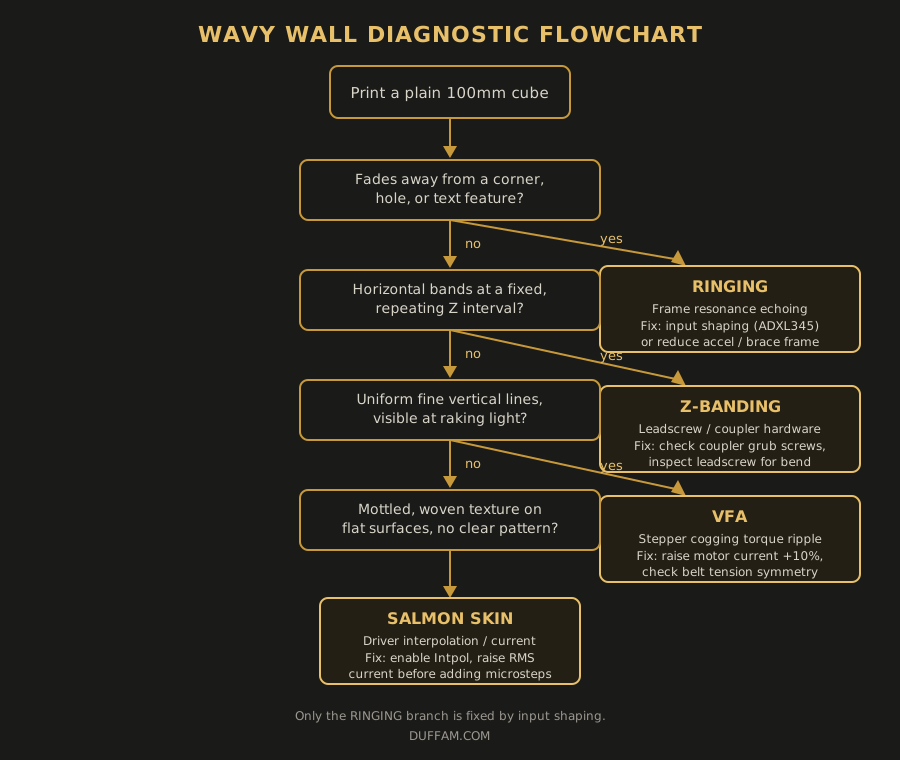
Before you touch your input shaper config, print a plain 100mm cube (no text, no holes) and answer three questions:
- Does the pattern fade away from specific features, like corners and text, or is it uniform across flat walls? Fading-from-a-feature is ringing. Uniform-everywhere rules ringing out.
- Is it horizontal or vertical? Horizontal bands that repeat at a fixed Z interval point to leadscrew/coupler hardware, not motion tuning. Vertical lines point toward VFA.
- Does it look like a texture or a wave? A woven, mottled texture that doesn't correspond to any print feature is salmon skin — a driver current/interpolation problem, not a mechanical one.
If you answered "uniform, vertical, wave-like" — that's VFA, and you should be looking at motor current and belt tension, not resonance compensation. If you answered "horizontal, fixed interval" — walk over to your Z rods before opening any firmware config.
Fixing what you actually have
For VFA, start by increasing X/Y stepper RMS current in 10% increments (most 42-40 steppers tolerate up to 1.2A before overheating — check your specific motor's rated current first) and retest the same flat-wall cube. If that doesn't resolve it, check belt tension symmetry between X and Y; uneven tension changes the frequency at which cogging ripple couples into the frame, sometimes making it worse in one direction only.
For Z-banding, remove the Z coupler cover and inspect where the grub screws land on the stepper motor shaft — if both screws are on the same round section instead of one seated on the D-flat, the shaft can slip fractionally under load, which reads as inconsistent Z lift. Also roll the leadscrew across a flat surface; visible wobble means it's bent and needs replacing, not adjusting.
For salmon skin, check your driver's interpolation setting first — on standalone TMC2208/2209 setups this is a physical pin state (CFG pins) that's easy to leave in the default non-interpolated mode when boards are swapped. If interpolation is already on, the next lever is current, not microstep resolution — cranking microsteps from 1/16 to 1/256 without adequate current just gives the driver more steps it can't resolve.
The point
Input shaping is a genuinely excellent fix — for the one defect it targets. Running it against VFA, Z-banding, or salmon skin doesn't just fail to help; it burns an evening of accelerometer calibration on a problem that was never in the motion profile to begin with. Diagnose the pattern before you touch the tuning.
Print Cleaner Walls, Every Time
Every DuffAM part is checked for exactly this kind of surface defect — ringing, VFA, ghosting — before it ships. Tell me what you need and I will make sure it prints clean.
Order Direct at DuffAM