The edge of an overhang lifts into a little curled lip. On the next pass the nozzle drags through it, the part shows a rough scar, and sometimes the whole layer shifts. The standard advice is to turn the fan up, and it helps, but it only treats half the problem. An overhang edge curls because it has too much plastic and nowhere to put it. A hot line laid over air has nothing underneath to push the excess down into and nothing to pull the heat away, so the edge swells, shrinks unevenly as it cools, and bends upward.
| Symptom / Value | What It Means |
|---|---|
| Curl also on gentle slopes or flat-layer corners | Over-extrusion: too much plastic per path, not a cooling or angle issue |
| Clean to ~45° from vertical, bad past ~55° | Geometry: the line sits mostly or fully over air (see the chart) |
| Worse on small features, better on big ones | Layer time too short; the previous layer is still hot |
| Nozzle ticks or drags on the curled lip | Curl is taller than the layer height; fix before it causes a layer shift |
| Raising nozzle temp by 10°C made it worse | Heat-limited; the edge never froze in time |
| Rough, bubbly overhang underside | Wet filament adding steam to the problem; dry the spool first |
Every Layer Steps Out by Height Times Tan of the Angle
Take an overhang at an angle measured from vertical. Each new layer has to sit outward from the one below by layer height × tan(angle). At 0.2 mm layers and 45°, that step is 0.20 mm. With a 0.42 mm line, about half the new line is hanging past what's below it. At 60° the step is 0.35 mm and roughly 80% of the line is unsupported. At 65° the step is 0.43 mm, which is more than a whole line width, so the line has no contact with the layer below at all.
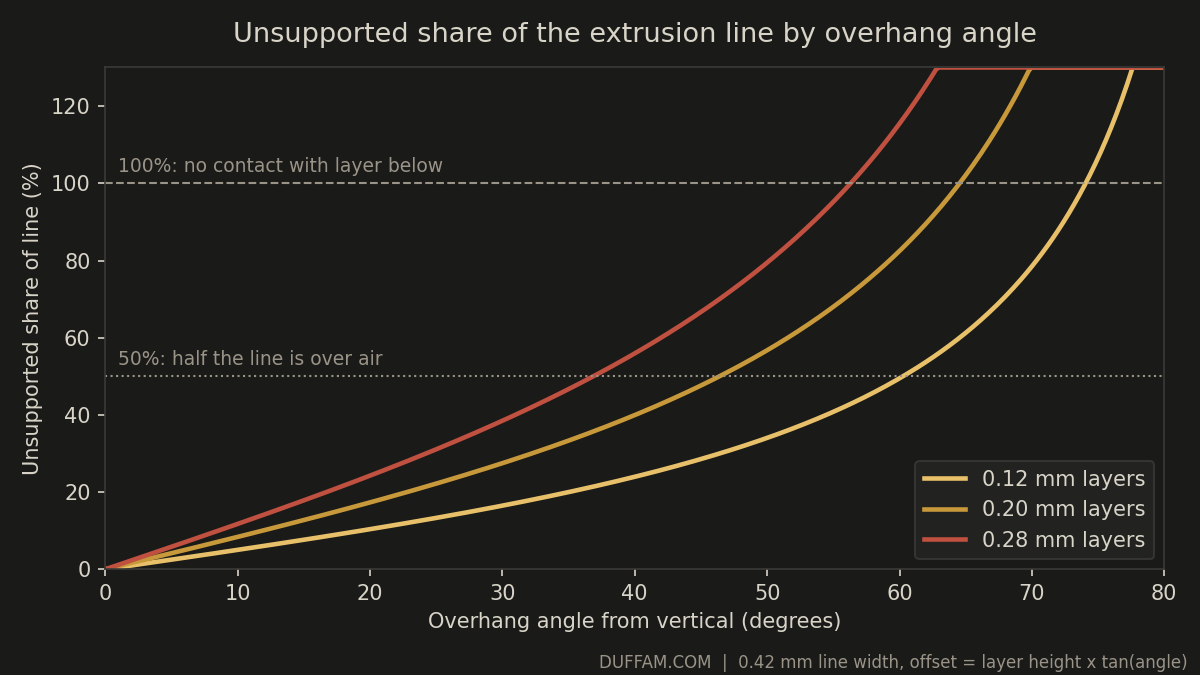
That is why overhangs behave fine, then suddenly don't. The relationship is not linear; tangent climbs steeply. It also explains an easy first win: dropping from 0.28 mm to 0.12 mm layers moves the 100% point from about 56° to about 74°.
The MechanismWhy the Edge Curls Up Instead of Sagging Down
Over a supported layer, the nozzle squishes the line down into the one below it, and the layer beneath carries heat away. Over air, neither happens. The extruded volume has to go somewhere, and with the nozzle pressing from above and nothing below, the easiest direction is sideways and up. The exposed outer edge also loses heat faster than the underside, so it contracts first and pulls the line upward. Excess flow makes the swelling bigger; a hot nozzle and slow cooling keep the plastic soft long enough for the bend to set.
In This Order
- 1Check flow before coolingLower the flow ratio in 2% steps (for example 0.98, 0.96, 0.94) and reprint the same overhang test. Stop when the walls still close without gaps. If curl also appears on shallow slopes, this step alone often solves it. A pressure advance value that is too low leaves bulged corners that also curl.
- 2Fan on the overhang wallsPLA wants 100%. PETG and PCTG tolerate roughly 50–70% before layer bonding starts to suffer; if your slicer has an overhang fan boost, use it rather than raising the fan for the whole print.
- 3Slow only the overhanging segmentsAround 20–30 mm/s on walls that are more than half unsupported gives the line time to freeze. Most current slicers have a dynamic or per-percentage overhang speed setting; use it instead of slowing the entire wall.
- 4Give small layers more timeSet a minimum layer time of roughly 8–10 s. A tiny peak or boss reprints on top of plastic that has not cooled, and curl compounds layer after layer.
- 5Drop the nozzle 5–10°C and dry the spoolStay inside the filament's good range. Cooler plastic freezes sooner, and dry filament stops steam from roughening the edge.
- 6Fix the geometryAdd a 45° chamfer in place of a 70° slope, split the part, or accept supports. If you're still curling after steps 1–5, the angle is simply too steep for the layer height. Reversing perimeter direction on overhang layers (called "reverse on even/odd" in Orca-based slicers) is a last resort that stops curl from stacking, not a cure.
What to Expect by Angle at 0.2 mm Layers
| Angle | Step / layer | Unsupported | Plan |
|---|---|---|---|
| 30° | 0.12 mm | 27% | Clean on defaults |
| 45° | 0.20 mm | 48% | Fine with normal cooling |
| 55° | 0.29 mm | 68% | Fan to 100%, slow the perimeters |
| 60° | 0.35 mm | 82% | Fan, slow, flow tuned; expect a rougher underside |
| 65° | 0.43 mm | 100%+ | Zero overlap: line sits in air; support or redesign |
These are geometric ceilings, not guarantees; real lines overlap the layer below slightly because they flatten as they're laid. Print a small 30/45/60° test wedge in your actual filament before trusting any number on a real part.
For functional parts with overhangs, PCTG is our recommendation. It avoids the heavy shrinkage that makes ABS and ASA curl, and its modified CHDM structure keeps moisture uptake near 0.15%, lower than PLA and a clear step up from PETG. That matters here because wet filament adds steam bubbles that make the edge lumpy and exaggerate curl. Dry the spool first, then judge your overhangs.
Curl is a three-way balance between how much plastic you push, how much of it has something to land on, and how fast it freezes. Fix them in that order and the fan stops being your only lever. For where overhangs and other FDM limits stop being tunable and become design decisions, see our Realistic Capabilities breakdown.
Overhangs That Come Off the Printer Clean
DuffAM tunes overhang cooling, speed, and flow per part instead of trusting a default profile, so steep faces finish without curled lips.
Order Direct at DuffAM →Another unsupported-span problem: the top skin bridging across sparse infill, and the cooling that fixes it.
Corner Lift Isn't an Adhesion Problem — It's ShrinkageCurling at the bed instead of the overhang: the same uneven-cooling mechanism in ABS, ASA, PC and nylon.