Extruder clicking gets one universal diagnosis on every forum thread: "clogged nozzle, do a cold pull." Sometimes that's right. Most of the time it isn't — and if you cold-pull a hotend that was never clogged, you've wasted twenty minutes and changed nothing. The click is your extruder motor skipping steps because something downstream is resisting it harder than the stepper can push through. That "something" has at least five distinct causes, and they don't look the same. They click at different times, in different rhythms, and they leave different evidence on the filament itself. Read the pattern before you touch the hotend.
| What You're Seeing | Likely Cause |
|---|---|
| Clicking from the first layer, worse on solid infill or top layers | Flow demand exceeding melt temperature |
| Steady, low-grade clicking from layer one that never fully goes away | Partial clog, not a full blockage |
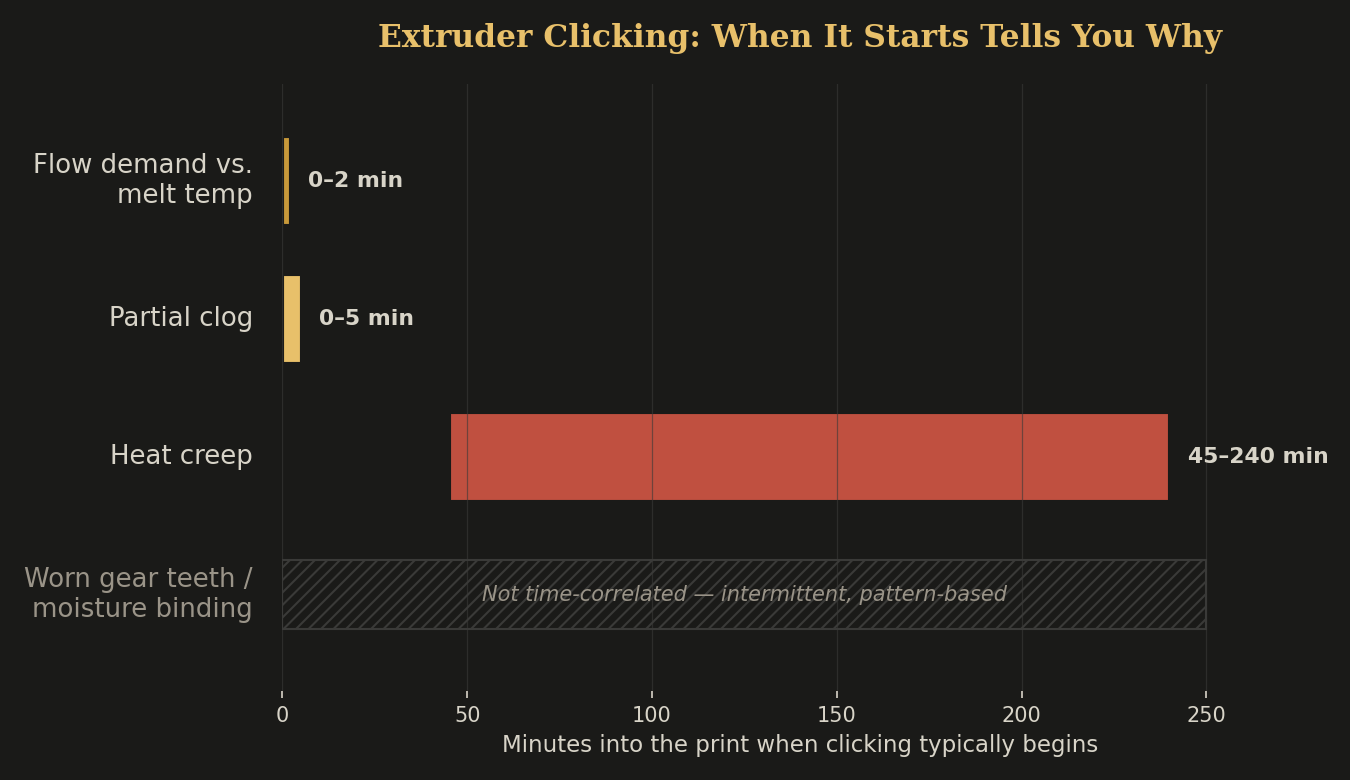
| Clean print for 45+ minutes, then clicking plus a spaghetti tower | Heat creep |
| Same flat, shiny groove ground into the filament every time it clicks | Worn or stripped extruder gear teeth |
| Filament feels stiff, slightly swollen, or binds when fed by hand | Moisture-swollen filament in the PTFE path |
Why "It's Probably Clogged" Wins by Default
Clogs are the first thing people learn to fix, so they become the first thing people suspect. But a fully clogged nozzle doesn't click intermittently — it stops extruding almost entirely and the clicking becomes constant and violent within seconds. If your clicking is occasional, rhythmic, or tied to a specific moment in the print, you're not looking at a clog. You're looking at one of four other failure modes that all present as "the extruder is clicking" but need completely different fixes.
Flow Demand Outpacing Melt Temperature
Every hotend has a volumetric flow ceiling — the maximum mm³/s it can melt filament fast enough to keep up with your nozzle. A stock brass nozzle at 210°C on PLA tops out around 7–10 mm³/s. Push past that ceiling — wide extrusion widths, fast infill, a big flat top layer at full speed — and the extruder tries to force filament through a channel that isn't fully molten yet. It clicks because it's fighting solid plastic, not steam or char.
This shows up immediately, gets worse on solid layers and infill (where flow demand spikes), and gets better the instant you slow down or bump temperature 5–10°C. If your clicking tracks your slicer's flow rate graph almost exactly, this is it. Raise nozzle temp in 5°C steps or drop your top-layer speed before you touch anything else.
Cause 2A Partial Clog That Isn't Fully Blocking Yet
A true clog stops flow outright. A partial clog — carbonized residue narrowing the nozzle bore, a fleck of debris caught at the orifice — just adds constant back-pressure. The extruder clicks at a steady, low rate from the very first layer and it doesn't correlate with speed or layer type the way Cause 1 does. It's just always a little bit angry.
The tell: retract the filament a few centimeters and push it back in by hand with the nozzle hot. If you feel resistance that's stronger than it should be and roughly constant regardless of how fast you push, that's a narrowed bore, not a temperature problem. A cold pull actually is the right fix here — this is the one case where the forum advice is correct.
Cause 3Heat Creep
Heat creep is real, common, and distinct enough that we already wrote the full diagnostic for it — see Heat Creep: the clog that's not a clog for the full breakdown. The short version for pattern-matching here: heat creep clicking starts well into a print (typically 45 minutes to 4+ hours depending on part cooling airflow, ambient temperature, and total print duration), not from layer one, and it happens on prints with heavy retraction that keep pulling hot, soft filament up into the heatbreak where it shouldn't be. If your printer ran clean for most of an hour before it started clicking, don't reach for the hotend — check your heatbreak cooling first.
Cause 4Worn or Stripped Extruder Gear Teeth
This one isn't in the hotend at all. The hobbed gear that grips your filament has teeth that bite in and pull. Over months of use — especially with abrasive filaments like carbon-fiber blends, or with idler tension cranked too tight trying to "fix" a different clicking problem — those teeth round off. A worn gear can't maintain grip under load, so it slips and clicks even when the hotend is doing nothing wrong.
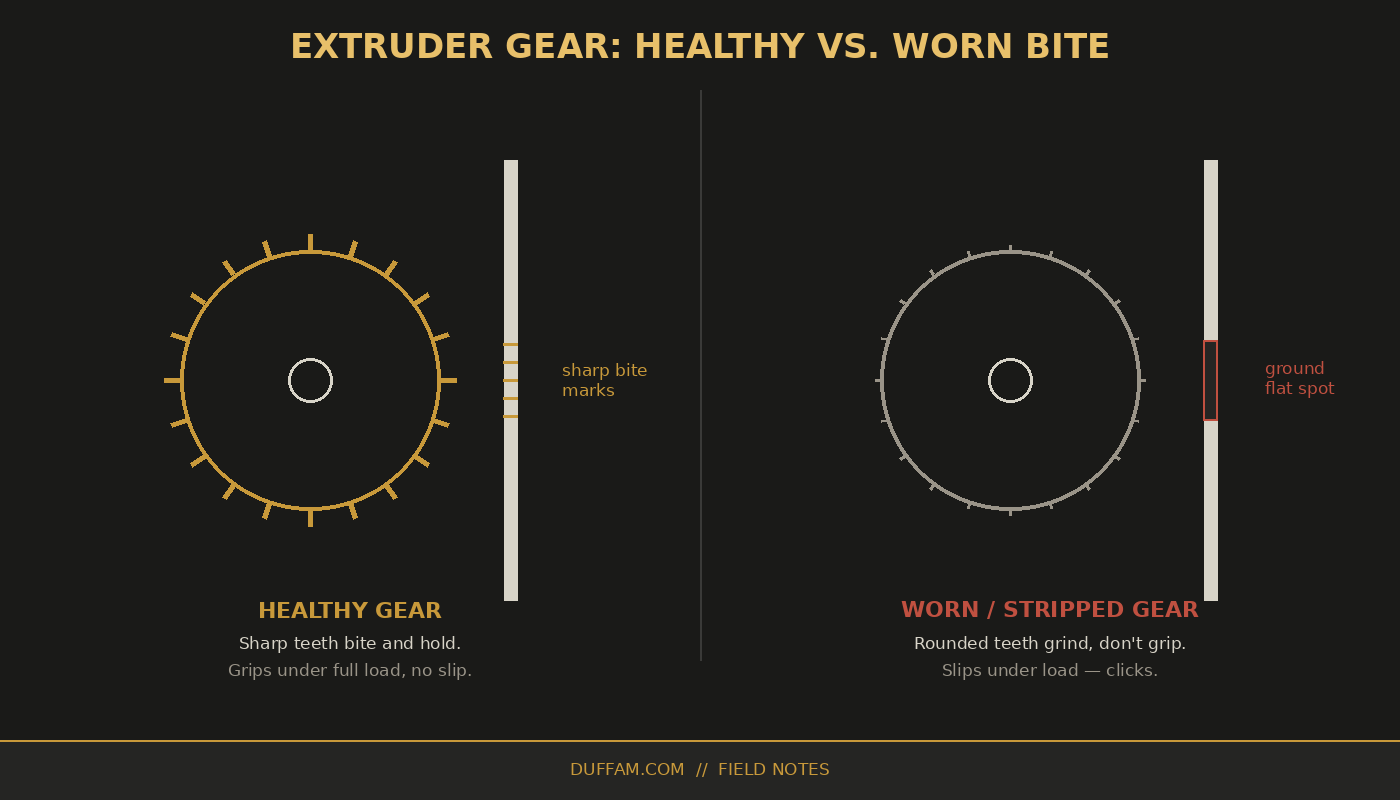
If you see a shiny, flattened channel ground into the filament — sometimes filing all the way through one side — no amount of temperature tuning will fix it. Replace the gear, or back off idler tension if it's been over-tightened.
Cause 5Moisture-Swollen Filament Binding in the PTFE Path
This is different from the moisture problem we covered in Your Filament Is Wet — and You're Blaming Everything Else for It. That post is about moisture boiling inside the melt and causing pops, stringing, and weak layers. This is friction in the feed path, before the filament ever reaches heat. Hygroscopic filaments — nylon and TPU are the worst offenders, PETG less so — swell slightly in diameter as they absorb ambient moisture. In a PTFE tube cut to a tight tolerance, that extra fraction of a millimeter is enough to create drag the extruder has to fight the entire length of the bowden path, not just at the hotend.
If you're chasing this specific failure mode across a rotating cast of filaments, it's worth knowing where PCTG sits: its modified CHDM structure gives it roughly 0.15% moisture absorption — meaningfully lower than PLA and a strong step up from standard PETG in humid shops. It swells less, binds less, and tends to just not produce this failure mode in the first place, which is part of why it's become our default when a part needs PETG-like toughness without PETG's moisture sensitivity.
The tell: unspool a length by hand with the printer idle. If it feels stiff, slightly tacky, or resists bending in a way fresh filament from a sealed bag doesn't, moisture is the more likely explanation than a mechanical fault. Dry it — 6–8 hours at 55°C for nylon, less for PETG — before you replace any hardware.
Diagnostic FlowWhen It Clicks Tells You Why
A 90-Second Diagnostic You Can Run Right Now
- 1Note when it started. Immediate and layer-dependent points to Cause 1. Immediate and constant points to Cause 2. Delayed by 45+ minutes points to Cause 3.
- 2Pull the filament and look at it. A ground flat spot is Cause 4. Stiff, swollen, or tacky filament is Cause 5.
- 3Push filament back in by hand, hot. Even, constant resistance confirms a partial clog (Cause 2). No unusual resistance rules it out.
- 4Only then reach for the hotend. A cold pull fixes exactly one of these five causes. Running it on the other four wastes your time and tells you nothing.
- Note the exact moment clicking started before you touch anything
- Pull the filament and inspect the contact spot for a ground groove
- Push filament back in by hand, hot, to feel for constant back-pressure
- Check whether clicking tracks your slicer's flow-rate graph
- Only run a cold pull once a partial clog is actually confirmed
The instinct to blame the nozzle first is understandable — it's the part you can see and the fix everyone already knows. But clicking is your printer's most honest error message. It's telling you exactly where the resistance is; you just have to read the timing and the evidence instead of skipping straight to the fix that worked last time.
If your print program consistently runs into flow ceilings or moisture-sensitive materials in a working shop environment, that's usually a sign the part is better suited to a controlled, professional print run than another weekend of calibration — see our realistic capabilities breakdown for where that line usually sits.
Prints That Don't Fight Their Own Feed Path
Every DuffAM print runs on dialed-in extruders, dried filament, and flow rates matched to the hotend — so the parts we ship never had a clicking problem to diagnose in the first place.
Order Direct at DuffAM